![LottoShield Logo -2.png]](https://help.lottoshield.com/hs-fs/hubfs/LottoShield%20Logo%20-2.png?height=50&name=LottoShield%20Logo%20-2.png)
As part of LottoShield’s service, your team receives a daily email that provides a comprehensive status overview of your company and each store. This email highlights key operational issues, reconciliation results, and activity from the previous day, helping you monitor performance at a glance.
Snapshot Section
The Snapshot section provides high-level statuses for your entire company. Examples include:
-
Locations where a Sales Tracker or Scanner is offline
-
Stores that have not yet completed installation
-
Your company-wide over/short total
This section is designed to quickly alert you to issues that may require immediate attention.
Store Details Section
The Store Details section includes reconciliation results from the prior day for each location. It evaluates the following categories:
-
Display Case
-
Online Lotto
-
Payouts
-
Vending Machines
Each category can show one of three outcomes:
-
Positive dollar value → Overage
-
Negative dollar value → Short
-
Green checkmark → Successful reconciliation
In addition to reconciliation results, this section also displays:
Missing Packs
-
Shows the number of packs missing over the past 7 days.
Packs
-
Displays how many packs were issued, confirmed, activated, or settled the previous day.
New Games
-
Indicates when new games were added to your pricebook the previous day.
Missing Audits
-
Alerts you when a store did not perform at least one display case audit the day before.
When you need more detail, simply click the Visit LottoShield button at the bottom of the email to go directly to the LottoShield Portal.
Example Daily Email
|
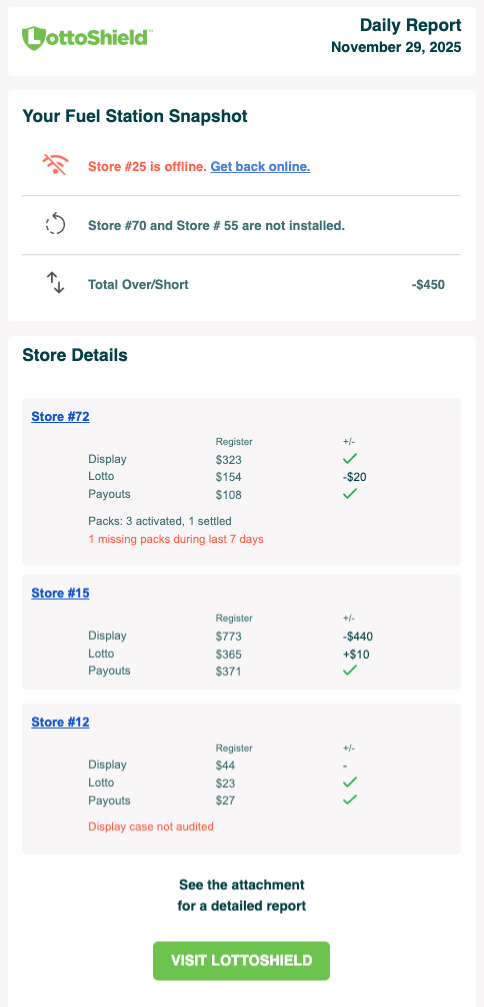
In this example, “Your Fuel Station” shows:
Each location also displays its reconciliation breakdown for the day. Store #72 shows pack activity from the previous day (3 activated, 1 settled) as well as a missing pack. Store #12 indicates that no display case audit was completed the day before.
|
 |
Attached CSV File
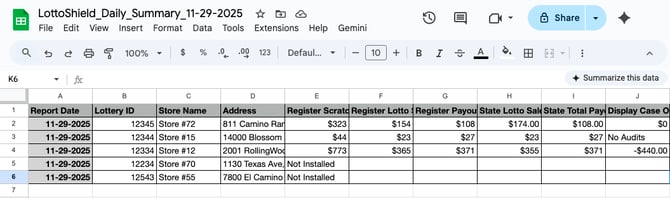
Every Daily Email includes an attached CSV file containing the lottery details and statuses for your entire company. This file provides a more granular view of performance across all locations. CSV files can be opened in the spreadsheet application of your choice.
The example below shows the CSV file opened in Google Sheets. This represents only a portion of the data included in the full file and is shortened for display purposes.
Large Companies (25+ Locations)
If your company has more than 25 locations, the Store Details section will not display every store. Instead, it prioritizes locations with:
-
The largest overs and shorts
-
Missing packs
The attached CSV file will still include all stores for your company.
User Permissions
Daily Emails are customized based on each user's access level:
-
Administrators receive details for every location in the company.
-
Limited Users receive details only for the locations assigned to them.
For example:
-
A store manager will typically see information only for their store.
-
A district manager will see information for all stores they oversee.
Note: Users get the Daily Email by default. If preferred, users can opt out of receiving the LottoShield Daily Email. An administrator can disable this by deselecting the Subscribe to daily reports checkbox on the Edit Users page.
For more information, see Editing Existing User Settings.