![LottoShield Logo -2.png]](https://help.lottoshield.com/hs-fs/hubfs/LottoShield%20Logo%20-2.png?height=50&name=LottoShield%20Logo%20-2.png)
The Packs page provides a comprehensive view of your store's scratcher inventory, including packs in Backstock, Missing Packs, Vending Machine, and Returned.
Each section allows you to review pack information, track inventory status, and investigate discrepancies. Select Packs from the left navigation menu in LottoShield Pro to access these views. The Backstock tab opens by default.
Backstock
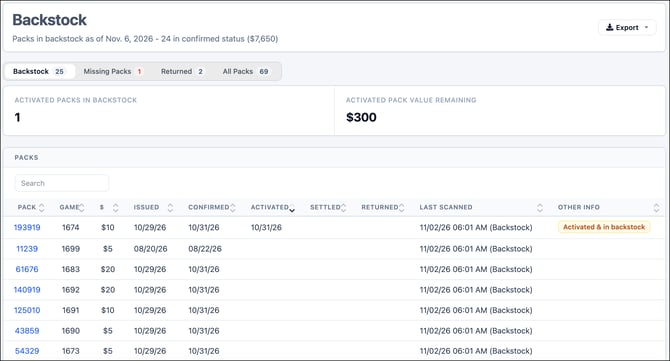
The Backstock page displays packs currently assigned to backstock, excluding packs in display cases or vending machines.
The page header shows the number of packs currently in confirmed status and their total value.
A summary below the navigation tabs displays:
- Activated Packs in Backstock — The number of activated packs currently in backstock.
- Activated Pack Value Remaining — The remaining ticket value of those activated packs.
The Packs table lists individual packs with their game number, ticket price, state lottery status dates, and last scanned location and time.
Use Search to find a specific pack, click a column heading to sort the table, or select a linked pack number to open its Pack Details page.
Missing Packs
Select Missing Packs from the tabs at the top of the Packs page to review packs LottoShield has identified as missing.
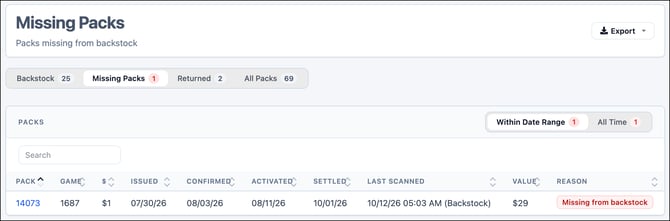
A pack may be considered missing when it was previously confirmed in backstock but is absent from a subsequent backstock audit, or when a pack previously audited in backstock cannot be accounted for after activation.
The table includes pack and game numbers, ticket prices, state lottery status dates, the last scanned date, missing value, and the reason the pack was flagged.
Use the Within Date Range and All Time tabs to switch between missing packs associated with the selected date range and the complete history of missing packs.
Click a linked pack number to open Pack Details for further investigation.
Investigate missing packs promptly to determine their location and address discrepancies.
Vending Machine
For stores with a vending machine, select Vending Machine from the Packs navigation tabs to review packs associated with that machine.
The page includes three views: All VM Packs, Last VM Audit Only, and Not in VM.
All VM Packs
Displays the historical list of packs recorded in the vending machine.
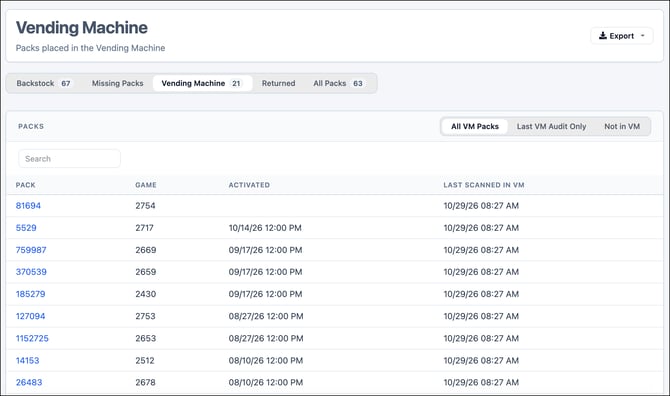
The table includes pack number, game number, activation date, and the date and time the pack was last scanned in the vending machine.
Use Search to locate a specific pack or click a linked pack number to open Pack Details.
Last VM Audit Only
Displays packs recorded during the most recent vending machine audit.
This view is useful for reviewing which packs were included in the latest scan without searching through the machine's full history.
Not in VM
Displays activated packs that may have been placed in the vending machine but were not properly recorded.
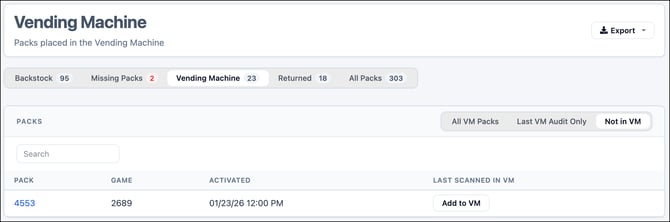
This view helps identify packs that may need investigation or correction. Depending on the available records, the list may be empty.
Important: The recommended method for tracking packs added to a vending machine is to scan them using the Vending Machine function on your LottoShield handheld device when they are placed into the machine.
Returned
Select Returned from the Packs navigation tabs to review packs that have been returned or are pending return to the state lottery.
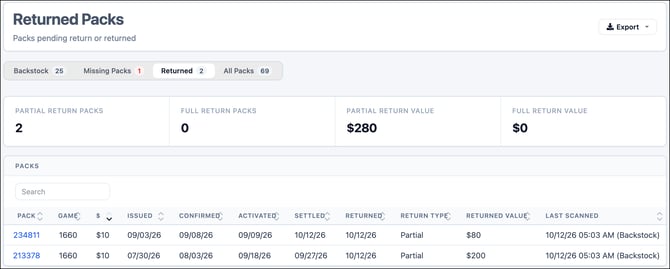
The page includes a summary of:
- Partial Return Packs
- Full Return Packs
- Partial Return Value
- Full Return Value
The Packs table provides individual pack details, including game number, ticket price, state lottery status dates, return type, returned value, and last scanned information.
All Packs
Select All Packs to review the store's pack inventory and history in one location.
Use Within Date Range to display packs associated with the selected reporting period, or All Time to review the complete pack history.
The table includes:
- Pack and game numbers
- Ticket price
- Issued, Confirmed, Activated, Settled, and Returned dates
- Last scanned date, time, and location
- Additional pack information when available
Use Search to locate a specific pack, select a column heading to sort the results, or click a linked pack number to open Pack Details.