![LottoShield Logo -2.png]](https://help.lottoshield.com/hs-fs/hubfs/LottoShield%20Logo%20-2.png?height=50&name=LottoShield%20Logo%20-2.png)
Lottery operations often involve people with different responsibilities, including corporate and accounting teams, regional and district managers, store managers, and store employees.
User Management allows administrators to control:
- Who can access the LottoShield portal
- Each user’s role and access level
- Which store locations a user can access
- Manager assignments for each location
- Whether a user can resolve issues or make administrative changes
- Which email reports a user receives
LottoShield allows you to create as many users as your organization needs and configure each user based on their responsibilities.
User Management Views
User Management provides three ways to review your users, location assignments, and management structure.
By User
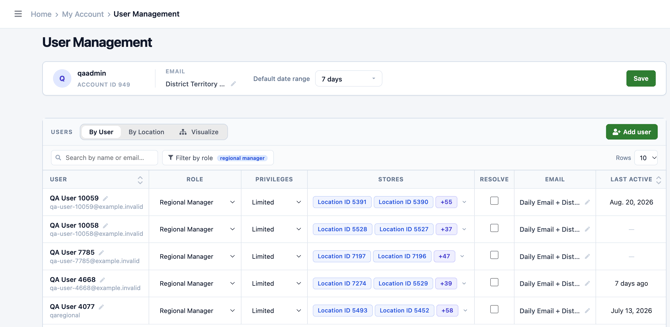
The By User view organizes information by individual user.
Use this view to:
- Search for a user
- Filter users by role
- Review a user’s role and assigned locations
- Edit user information
- Add or remove location access
- Change email report preferences
- Manage user permissions
This view is best when you need to review or update one specific person.
By Location
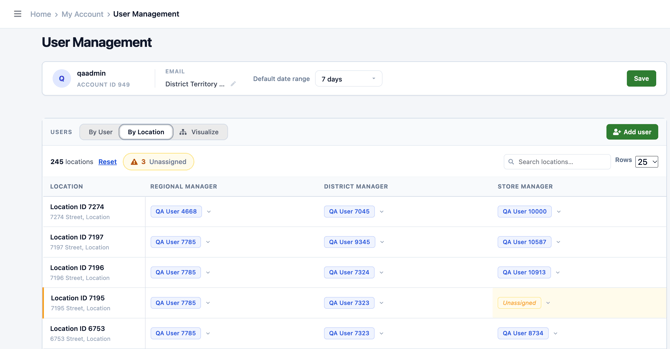
The By Location view organizes manager assignment by store.
Use this view to:
- Select or search for a store location
- Review the managers assigned to that location
- Add a manager to a location
- Remove a manager from a location
- Confirm that each store has the appropriate management assignments
This view is useful when you know which location needs to be updated but do not want to open and edit each manager individually.
Manager assignments affect how locations are organized in Manager View Dashboard and how your management structure appears in the Organization Chart.
Visualize
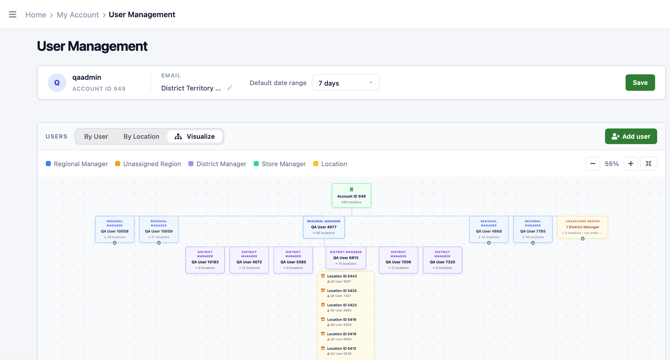
The Visualize option provides a read-only view of your organization’s current management structure.
Use it to review how regional managers, district managers, and store locations are connected.
The Organization Chart cannot be used to change a user’s role or location assignments. To make changes, use the By User or Managers by Location view.
User Roles and Access Levels
When your LottoShield account is created, the system creates a default administrator user. The default administrator has full permissions across all locations.
Additional users can be given either:
- Administrator access, which provides full account and administrative permissions
- Limited access, which restricts the user to their assigned locations and permitted actions
Each user is also assigned a role based on their responsibilities. Roles may include:
- Corporate / Accounting
- Regional Manager
- District Manager
- Store Manager
- Store Employee
A user’s role identifies their responsibility within the organization. Their location assignments determine which stores and store information they can access.
Administrative permissions determine whether a user can perform actions such as managing users and changing account settings.
Location Access and Manager Assignments
Users can be assigned to one or more store locations.
Location assignments affect:
- The stores the user can access in the LottoShield portal
- The information included in the user’s email reports
- How stores appear in the Manager View Dashboard
- How users and locations appear in the Organization Chart
Manager assignments should reflect your organization’s actual management structure. When assignments change, they can be updated either from the individual user or directly from the location.
Email Report Preferences
Email report delivery is configured separately for each user.
Available email preferences include:
- Daily
- Weekly Territory
- Monthly Territory
The reports a user receives are based on the locations assigned to that user. This allows administrators to provide each person with the reporting appropriate for their responsibilities without giving them access to unrelated locations.
Email preferences can be selected when adding a user and changed later from the user’s settings.