![LottoShield Logo -2.png]](https://help.lottoshield.com/hs-fs/hubfs/LottoShield%20Logo%20-2.png?height=50&name=LottoShield%20Logo%20-2.png)
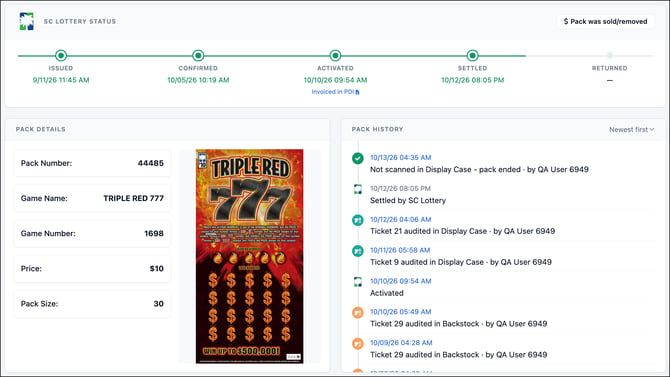
The Pack Details page provides information about a specific scratcher pack, including its state lottery status, game information, and activity history within LottoShield.
The page helps you track a pack from its initial issuance through activation, inventory audits, and eventual settlement or return.
State Lottery Status
At the top of the page, the State Lottery Status section displays the pack's progress through the state lottery system.
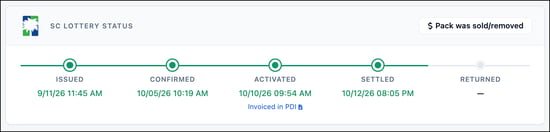
Depending on the state and available reporting, the following statuses may appear:
- Issued - The pack has been issued by the state lottery.
- Confirmed - The pack has been confirmed as received by the retailer.
- Activated - The pack has been activated for sale.
- Settled - The pack has been settled with the state lottery.
- Returned - The pack has been returned to the state lottery.
Completed statuses appear in green, along with the date and time recorded. Statuses that have not yet occurred appear in gray.
For customers with a PDI integration, an Invoiced in PDI link may appear beneath the Activated status. Click this link to open the corresponding PDI invoice.
Pack Details
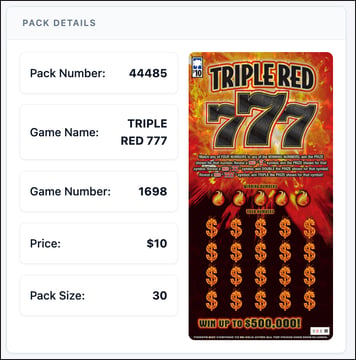
The Pack Details section identifies the selected pack and its associated game, including:
- Pack Number
- Game Name
- Game Number
- Ticket Price
- Pack Size
A game image is also displayed when available.
Pack History
The Pack History section displays a chronological record of activity associated with the selected pack, including inventory audits and recorded ticket numbers.
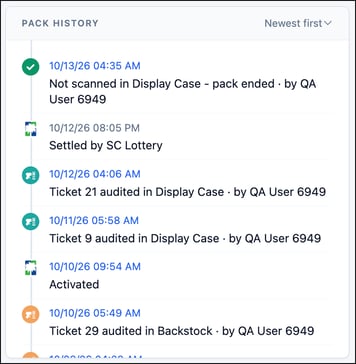
Each entry identifies the date and time of the event, a description of the activity, and the employee associated with it when available.
By default, the history displays the newest activity first. Use the sorting control to change the order.
Click a linked date and time in Pack History to open the Scratcher Timeline at that point in the pack's history. This allows you to review surrounding sales, audits, and employee activity for the game.
Pack Actions
Pack was Sold/Removed
The Pack Was Sold/Removed button allows you to remove a pack from inventory so it no longer appears as missing.

This action is intended as a last resort when a pack is no longer physically in the store and cannot be accounted for through normal audits.
Examples include:
- Unrecorded sales - A pack may have sold out during a period when audits were not being performed.
- Theft or loss - A pack has been stolen or otherwise removed from the store and cannot be recovered.
Use this option only after investigating the missing pack and confirming it should no longer be included in inventory.
This option is only available to users with resolution privileges.
Invalid Pack/Scanner Misread

When using camera-based scanning, an incorrect barcode reading can occasionally create a pack record that does not correspond to an actual pack in the store's inventory.
These records can often be identified by missing state lottery information, including Issued, Confirmed, and Activated dates.
If you determine that a pack record was created by an incorrect scan, use Invalid Pack/Scanner Misread to remove the invalid pack from inventory.
Only use this option after confirming that the pack does not represent an actual pack in the store.