![LottoShield Logo -2.png]](https://help.lottoshield.com/hs-fs/hubfs/LottoShield%20Logo%20-2.png?height=50&name=LottoShield%20Logo%20-2.png)
Whether you are replacing a lost or damaged PDA or upgrading to the latest scanning technology, you may need to purchase a new LottoShield PDA scanner for your store. This article explains how to place an order.
Purchasing a LottoShield PDA
- In the left navigation menu, select Settings.
- Click Billing. The Billing Settings page will open.
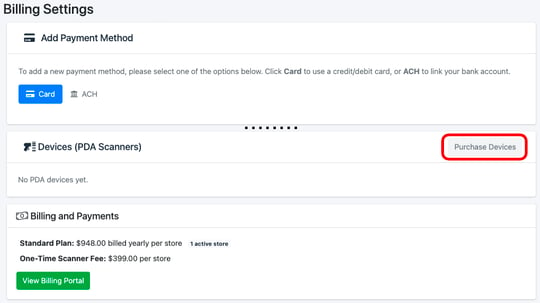
- Click the Purchase Devices button in the Devices (PDA Scanner) section.
The Add PDA Scanner page will open.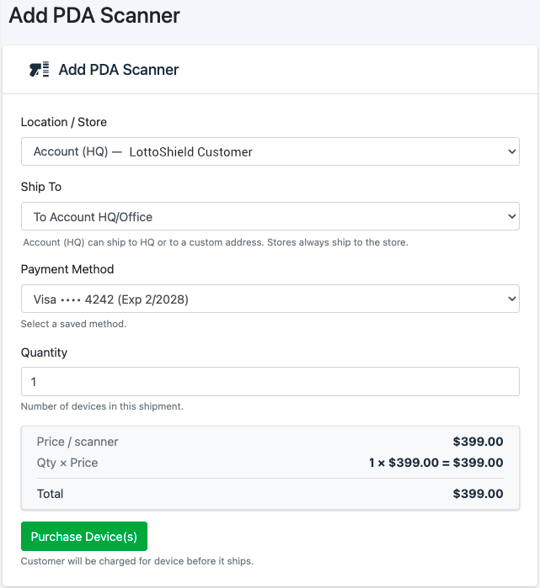
- Choose a Location, Ship To Address, Payment Method and Quantity.
- Click the Purchase Device(s) button.
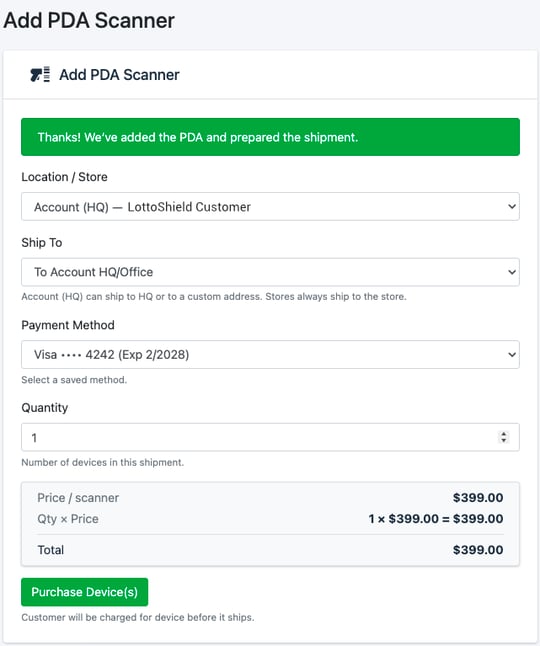
- You will see a confirmation that your order has been placed and that a shipment was created from LottoShield.