![LottoShield Logo -2.png]](https://help.lottoshield.com/hs-fs/hubfs/LottoShield%20Logo%20-2.png?height=50&name=LottoShield%20Logo%20-2.png)
LottoShield email reports help you spot reconciliation issues and review activity across the locations you oversee. Your available reports depend on your role and report assignments. These assignments are made in the User Management section in LottoShield Settings.
| Report | When it arrives | What it covers |
|---|---|---|
| Daily Report | Each day | The previous day’s company and store activity |
| Weekly District Territory Report | Monday | The prior 7 days across your districts |
| Monthly District Territory Report | The first of the month | The prior month across your districts |
Daily Report
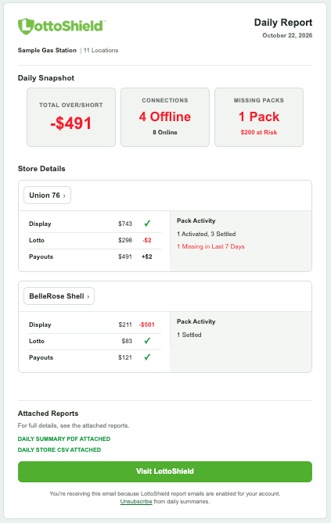
The Daily Report gives you a quick view of the previous day. Its Snapshot highlights company-wide over/short results and locations with connection or installation issues.
Store Details shows reconciliation results for the locations you can access, including display cases, backstock, vending machines, online lotto, and payouts where applicable. It also calls out activity and issues such as missing packs, pack activations and settlements, new games, and missing audits.
A positive dollar amount indicates an overage, a negative amount indicates a shortage, and a green checkmark indicates a successful reconciliation.
Daily attachments
Each Daily Report includes a PDF and CSV. The PDF presents company totals and store-by-store details in a format that is easier to read, save, or print. The CSV lets you review and work with the detailed data in a spreadsheet.
District Territory Reports
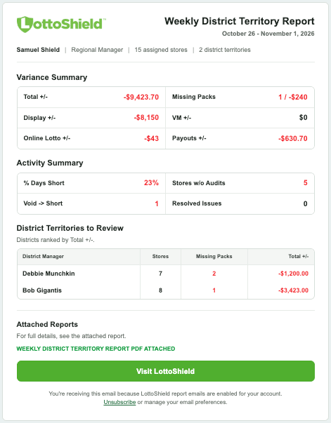
Weekly and Monthly District Territory Reports help users review the districts they oversee. Both reports use the same format; the reporting period differs.
Each email shows overall variance and activity for the territory, then lists district managers with a brief summary of their highest-priority issues.
Attachments
The Weekly report covers the prior 7 days. The Monthly report covers the prior month. Each includes a PDF with more complete report details. The PDF includes a store by store details for each district territory.
Reviewing More Detail
Select Visit LottoShield in an email to investigate further in the portal. You can also use the This Month date range on the Dashboard to review available month-to-date totals. The Dashboard’s month-to-date view does not currently include pack activity such as activations, settlements, and returns.
Who Receives These Emails?
Daily Report content reflects the locations a user can access. For example, an administrator may see company-wide information, while a store or district manager sees their assigned locations.
District Territory Reports are available to eligible users with access to multiple stores. An administrator can manage which reports users receive through their user settings.