![LottoShield Logo -2.png]](https://help.lottoshield.com/hs-fs/hubfs/LottoShield%20Logo%20-2.png?height=50&name=LottoShield%20Logo%20-2.png)
Tracking your backstock is an important part of using LottoShield Pro. While LottoShield automatically tracks pack statuses through state lottery integration, backstock audits add an extra layer of protection by verifying the physical presence of packs using the LottoShield app.
When performing a backstock audit, you must scan every pack in your backstock. Any packs not scanned will be flagged as missing.
Important: For partial packs in your backstock, always scan the next ticket to be sold, not the ticket number on the ends of the pack.
Perform Backstock Audit
|
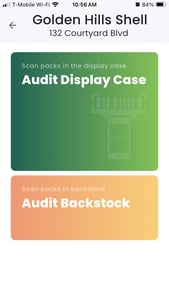
1. Open the LottoShield Mobile App. If you’re using a LottoShield PDA, this will be the default screen on your device.
|
 |
|
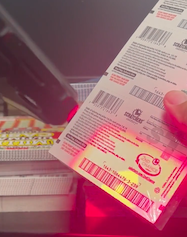
2. Tap Audit Backstock, then scan the long barcode on the back of each pack. Be sure to scan the first ticket based on your store’s roll direction:
|
 |
|
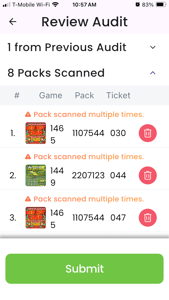
3. When you have scanned all packs in your backstock, tap Done, review the counts, then tap Submit. Note: Partial audits will cause reconciliation errors in LottoShield. You must always scan every pack in your backstock.
|
 |
For LottoShield's recommended auditing schedule, see When Should I Audit My Backstock? in the LottoShield Help Center.
Click here for a printable PDF version of these instructions.