![LottoShield Logo -2.png]](https://help.lottoshield.com/hs-fs/hubfs/LottoShield%20Logo%20-2.png?height=50&name=LottoShield%20Logo%20-2.png)
This procedure is for locations with vending machines that subscribe to LottoShield' s Managed Service.
Use this process whenever you close a vending machine shift and need LottoShield to reconcile vending machine activity. Some organizations close vending machine shifts daily, while others close them less often.
Note: This is a general procedure for performing vending machine audits, shift closes and reconciliation in LottoShield. Steps may vary slightly depending on the vending machine brand, model, lottery system, and the state where your location operates.
Scan All Vending Machine Bins
Open the vending machine and scan the tickets currently loaded in the bins.
In the LottoShield app:
- Tap Audit Vending Machine.
- Tap Scan All Bins.

- Scan the ticket barcode for the next ticket to be dispensed in each active bin.
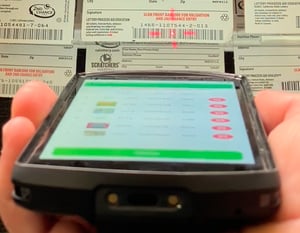
Note: You will use either the devices built in laser scanner (shown) or the build in camera. - When finished scanning, click Review and then Submit.
If the ticket barcode is not accessible, you may need to unload the bins to scan the correct ticket.
Some LottoShield customers may be configured to accept a scan of the second ticket instead. In that case, LottoShield records the prior ticket number for use in reconciliation. Only use this method if LottoShield has instructed your location to do so and confirmed that your location is set up for it.
Print the Shift Report and Close the Vending Machine Shift
Print the vending machine shift report and close the shift on the vending machine.
The exact process varies by vending machine, state, and lottery system. On some machines, closing the shift automatically prints the report. On others, the report must be printed before the shift is closed.
Important: If your machine does not automatically print the shift report during the close process, print the report before closing the shift. In some cases, the report data cannot be recovered after the shift is closed.
Need a cheat sheet for your vending machine? Download a simplified printable copy here!