![LottoShield Logo -2.png]](https://help.lottoshield.com/hs-fs/hubfs/LottoShield%20Logo%20-2.png?height=50&name=LottoShield%20Logo%20-2.png)
Performing routine display case audits is an essential part of using LottoShield Pro. This allows you to track scratchers that are sold from the display case.
First Audit
To get started, you’ll need to conduct your first inventory scan, or audit. This initial audit establishes a baseline from which all future ticket movement will be tracked. Be sure that you have completed Setting Up the LottoShield Scanner before attempting your first audit.
Note:
It is important to scan every pack in your display case during your first audit. If any packs are missed, your second audit will show large shortages because LottoShield will assume those packs were added after the first audit and that all tickets between the first ticket and the current ticket were sold.
The process is very simple:
|
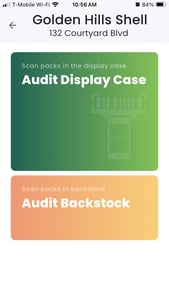
1. Open the LottoShield Mobile App. If you’re using a LottoShield PDA, this will be the default screen on your device.
|
 |
|
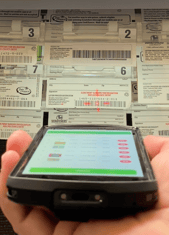
2. Tap the Audit Display Case button, then scan the long barcode on the back of each lottery pack in the display case. If you are using the LottoShield PDA, you will activate the scanning laser by pressing one of the buttons on the side of the device. If you are using your own device with the LottoShield Mobile app, you will use your devices camera. |
|
|
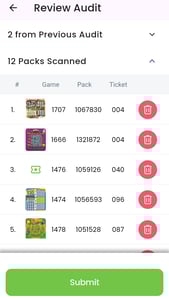
3. When you have scanned every pack in the display case, tap Done, review counts, then tap Submit. Note: Performing partial audits will create reconciliation errors in LottoShield. You must always scan every pack in your display case. |
 |
Congratulations! You’ve completed your first display case audit. But you’re not done yet. You must conduct daily audits for LottoShield to track your inventory.
For LottoShield's recommended auditing schedule, see When Should I Audit My Display Case? in the LottoShield Help Center.
Click here for a printable PDF copy of these instruction, using the LottoShield PDA scanner.
For a video tutorial, please see the Display Case Audits section of out training videos page.