![LottoShield Logo -2.png]](https://help.lottoshield.com/hs-fs/hubfs/LottoShield%20Logo%20-2.png?height=50&name=LottoShield%20Logo%20-2.png)
When SCiQ Inventory Summary reports contain no data, LottoShield will no longer show any audits from SCiQ and can no longer reconcile your POS lottery sales with ticket movement. When this happens, you will see the following banner in their LottoShield Portal:

Below are the steps you should take to keep LottoShield on track until your SCiQ issue is resolved.
Contact SCiQ
You will need to contact SCiQ support to report the issue using the support phone number listed on your SCiQ machine. This will get the resolution process started with SCiQ.
You can tell them "My SCiQ's Inventory Summary Report doesn't have any data in it.".
Performing SCiQ Audits with the LottoShield App
To ensure LottoShield keeps tracking and reconciling your scratchers, your store will need to begin performing audits with the LottoShield application on the SCiQ screen or from a printed report.
The LottoShield Application
Your store may already have a device with the LottoShield application installed, whether it is the LottoShield PDA scanner or another scanning device provided by your backoffice software company.
If you do not already have the LottoShield application on your handheld device, LottoShield offers mobile app versions for both iOS and Android devices. You can download the app using the links provided below.
 |
|

Once installed, simply sign in with your store locations LottoShield credentials to get started. If you do not know your locations credential, contact your administrator.
Performing an Audit on the SCiQ:
- At the top right of the main screen, tap Exit.
- At the top of the screen, select Reports and then Ticket Audit Report
- Tap Actual on the left side and then tap Load (see image below)
The correct barcodes will appear on the screen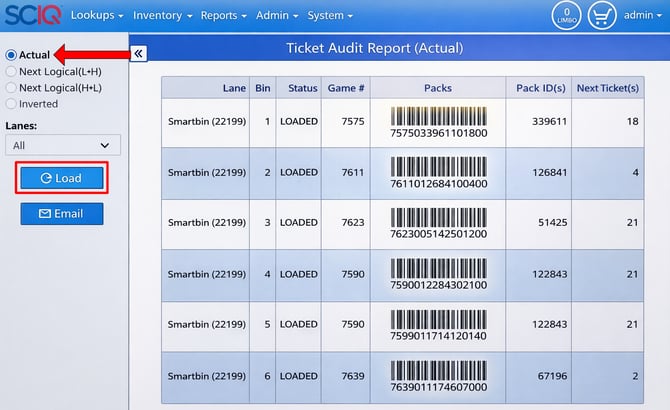
- Using Audit Display Case on the LottoShield app, scan the barcodes on the screen OR print the report and scan the barcodes from the paper
Note: Glare may make scanning the barcodes difficult. If this occurs, try shielding the screen from the source of the glare. - Review and Submit the audit on the LottoShield app
Though the process for performing display case audits is slightly different with SCiQ than a traditional display case, you can see how the LottoShield application performs audits in our training video.