![LottoShield Logo -2.png]](https://help.lottoshield.com/hs-fs/hubfs/LottoShield%20Logo%20-2.png?height=50&name=LottoShield%20Logo%20-2.png)
Once you’ve signed up for LottoShield’s 14-day free trial of LottoShield Pro, you’ll have two full weeks to explore the platform, train your employees on daily audits, and start experiencing the benefits firsthand.
During your trial, you’ll discover how LottoShield Pro helps you achieve:
-
Time savings through automation
-
Labor reduction by simplifying daily routines
-
Ticket theft prevention with accurate tracking
-
Simplified display case tracking
-
Automated sales reconciliations
-
Backstock inventory tracking
-
Missing pack alerts
Confirming Your Billing Options Before Your Trial Expires
Several days before your trial ends, you will receive an email reminding you to select your billing options and enter your payment details to avoid any disruption in service.
You will also see the banner shown below inside your LottoShield Portal.

- Click Confirm Billing in the banner.
The Billing Options window will open.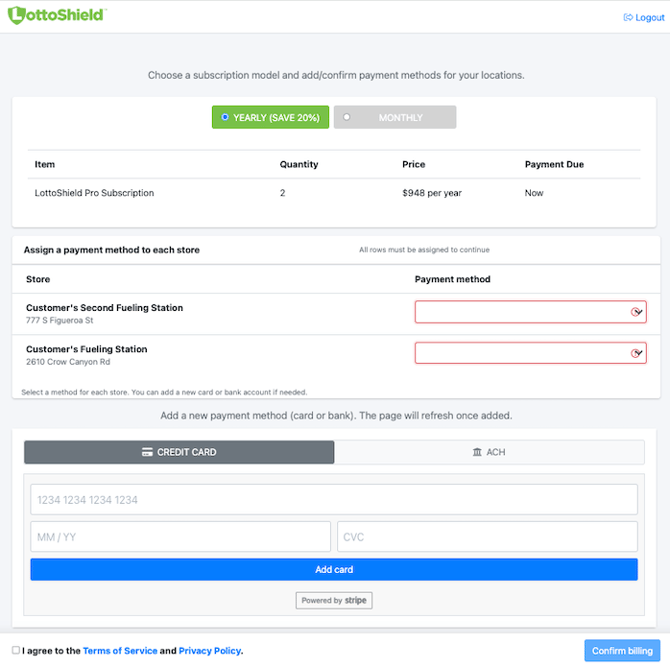
- Select either Yearly or Monthly. Choose the option that best fits your store’s preferences, Yearly saves 20% on your subscription as compared to Monthly.
- Select the payment method for each location.
- In the Payment Method column:
- Select an existing payment method from the dropdown, or
- Add a new payment method if one is not yet saved.
- In the Payment Method column:
- Once a payment method is added, the page will refresh and automatically populate the Payment Method field for each location.
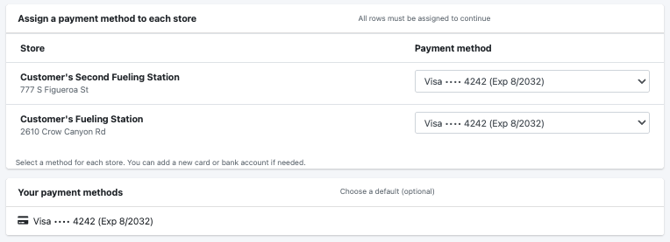
- If you prefer to use different payment methods for different locations, simply add another method and select it from the dropdown after the page refreshes. This should be done now to avoid having the payment method charged.
In the example below, we added an ACH- Instant Verification and selected it for one of the two locations.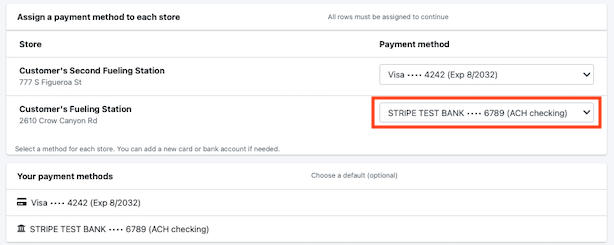
Important Note About ACH (Manual Entry)
If you choose manual-entry ACH, you will need to wait until the bank account is verified before it can be used for billing.
This typically takes 1–2 business days, depending on your bank.
See Adding Payment Methods in LottoShield for more details.
Unlocking Your Account After Your Trial Expires
If no payment or billing period information is entered before the end of your trial, your LottoShield Portal will be locked, and the popup window shown below will appear.
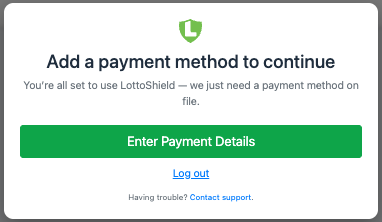
Click Enter Payment Details.
You will be taken to the Billing Options window as shown here.
Once a payment method has been added and verified, you will be charged for the options you selected and your access to LottoShield Pro will return.